<deployed-environment contact="" created="4/6/12" id="oracle" mod-id="" modified="4/6/12" name="oracle" type="Production">
<offering description="Financials" group="" id="XLE_FINANCIALS_JUR" mastered="FSCM" name="Financials" provisioned="false"/>
<offering description="Financial Control and Reporting" group="" id="XLE_FIN_CONTROL_JUR" mastered="FSCM" name="Financial Control and Reporting" provisioned="false"/>
<offering description="Enterprise Contracts" group="" id="OKC_CONTRACTS" mastered="CRM" name="Enterprise Contracts" provisioned="false"/>
<offering description="Customer Data Management" group="" id="ZCH_CDM" mastered="CRM" name="Customer Data Management" provisioned="false"/>
<offering description="Marketing" group="" id="MKT_MARKETING" mastered="CRM" name="Marketing" provisioned="false"/>
<offering description="Sales" group="" id="ZBS_SALES" mastered="CRM" name="Sales" provisioned="false"/>
<offering description="Procurement" group="" id="PO_PROCUREMENT" mastered="FSCM" name="Procurement" provisioned="false"/>
<offering description="Projects" group="" id="PJF_PROJ_MNG" mastered="FSCM" name="Projects" provisioned="false"/>
<offering description="Workforce Development" group="" id="PER_WKF_DEV" mastered="HCM" name="Workforce Development" provisioned="true"/>
<offering description="WorkForce Deployment" group="" id="PER_WKF_DEPL" mastered="HCM" name="WorkForce Deployment" provisioned="true"/>
<offering description="Compensation Management" group="" id="PER_CORE" mastered="HCM" name="Compensation Management" provisioned="true"/>
<offering description="Materials Management and Logistics" group="" id="INV_LOGISTICS" mastered="FSCM" name="Materials Management and Logistics" provisioned="false"/>
<offering description="Order Orchestration" group="" id="DOO_ORCHESTRATION" mastered="FSCM" name="Order Orchestration" provisioned="false"/>
<offering description="Product Management" group="" id="PIM_PROD_MNG" mastered="FSCM" name="Product Management" provisioned="false"/>
<offering description="Incentive Compensation" group="" id="CMP_OIC_BU" mastered="FSCM" name="Incentive Compensation" provisioned="false"/>
<deployed-database connection="" defaultPassword="" defaultUser="fusion_runtime" driver="oracle.jdbc.OracleDriver" host="yourdomain.com" id="fusion" multiDataSource="false" name="fusion" port="1521" rac="false" sid="FUSION" timeout=""/>
<deployed-domain admin-host="yourdomain.com" admin-port="10201" admin-server-name="" admin-server-protocol="t3" emHomeURL="" external-endpoint-host="yourdomain.com" external-endpoint-port="10622" external-server-protocol="https" id="BIDomain" installed="4/6/12" internal-endpoint-host="yourdomain.com" internal-endpoint-port="10621" internal-server-protocol="http" jmx-port="10201" name="BIDomain" node-manager-port="" node-manager-protocol="plain">
<deployed-application deployed="false" id="BiAcmApp" name="BiAcmApp" status="STOP"/>
<deployed-application deployed="true" id="bipApp" name="bipApp" status="START"/>
<deployed-application deployed="false" id="calc-managerApp" name="calc-managerApp" status="STOP"/>
<deployed-application deployed="false" id="essbaseApp" name="essbaseApp" status="STOP"/>
<deployed-application deployed="false" id="frApp" name="frApp" status="STOP"/>
<deployed-application deployed="true" id="obieeApp" name="obieeApp" status="START"/>
<deployed-application deployed="false" id="rtdApp" name="rtdApp" status="STOP"/>
</deployed-domain>
<deployed-domain admin-host="yourdomain.com" admin-port="7001" admin-server-name="" admin-server-protocol="t3" emHomeURL="" external-endpoint-host="yourdomain.com" external-endpoint-port="14000" external-server-protocol="http" id="IDMDomain" installed="4/6/12" internal-endpoint-host="yourdomain.com" internal-endpoint-port="14000" internal-server-protocol="http" jmx-port="7001" name="IDMDomain" node-manager-port="" node-manager-protocol="plain">
<deployed-application deployed="true" id="OracleIdentityManagementApp" name="OracleIdentityManagementApp" status="START"/>
</deployed-domain>
<deployed-domain admin-host="yourdomain.com" admin-port="9001" admin-server-name="AdminServer" admin-server-protocol="t3" emHomeURL="" external-endpoint-host="yourdomain.com" external-endpoint-port="10616" external-server-protocol="https" id="CRMDomain" installed="4/6/12" internal-endpoint-host="yourdomain.com" internal-endpoint-port="10615" internal-server-protocol="http" jmx-port="9001" name="CRMDomain" node-manager-port="5556" node-manager-protocol="ssl">
<deployed-application deployed="false" id="CRMEssDiagnosticDashboard" name="CRMEssDiagnosticDashboard" status="STOP"/>
<deployed-application deployed="false" id="ContractManagementApp" name="ContractManagementApp" status="STOP"/>
<deployed-application deployed="false" id="ContractManagementEssApp" name="ContractManagementEssApp" status="STOP"/>
<deployed-application deployed="true" id="CrmAnalyticsApp" name="CrmAnalyticsApp" status="START"/>
<deployed-application deployed="true" id="CrmCommonApp" name="CrmCommonApp" status="START"/>
<deployed-application deployed="false" id="CrmDataQualityApp" name="CrmDataQualityApp" status="STOP"/>
<deployed-application deployed="true" id="CrmDiagnosticDashboardApp" name="DiagnosticsUI-Assembly" status="START"/>
<deployed-application deployed="false" id="CrmEssApp" name="CrmEssApp" status="STOP"/>
<deployed-application deployed="false" id="CrmPerformanceApp" name="CrmPerformanceApp" status="STOP"/>
<deployed-application deployed="false" id="CrmSearchApp" name="CrmSearchApp" status="STOP"/>
<deployed-application deployed="false" id="CrmSetTransformServiceApp" name="CrmSetTransformServiceApp" status="STOP"/>
<deployed-application deployed="true" id="CrmSoaApp" name="soa-infra" status="START"/>
<deployed-application deployed="true" id="CrmWsmpmApp" name="CrmWsmpmApp" status="START"/>
<deployed-application deployed="false" id="CustomerApp" name="CustomerApp" status="STOP"/>
<deployed-application deployed="false" id="FusionBhdApp" name="FusionBhdApp" status="STOP"/>
<deployed-application deployed="false" id="FusionCtdApp" name="FusionCtdApp" status="STOP"/>
<deployed-application deployed="false" id="FusionEsdApp" name="FusionEsdApp" status="STOP"/>
<deployed-application deployed="false" id="MarketingApp" name="MarketingApp" status="STOP"/>
<deployed-application deployed="false" id="OrderCaptureApp" name="OrderCaptureApp" status="STOP"/>
<deployed-application deployed="false" id="OutlookEditionApp" name="OutlookEditionApp" status="STOP"/>
<deployed-application deployed="false" id="SalesApp" name="SalesApp" status="STOP"/>
<deployed-application deployed="false" id="odi-crm" name="odi-crm" status="STOP"/>
</deployed-domain>
<deployed-domain admin-host="yourdomain.com" admin-port="7401" admin-server-name="AdminServer" admin-server-protocol="t3" emHomeURL="" external-endpoint-host="yourdomain.com" external-endpoint-port="10604" external-server-protocol="https" id="FinancialDomain" installed="4/6/12" internal-endpoint-host="yourdomain.com" internal-endpoint-port="10603" internal-server-protocol="http" jmx-port="7401" name="FinancialDomain" node-manager-port="5556" node-manager-protocol="ssl">
<deployed-application deployed="true" id="FinancialCommonApp" name="FinancialCommonApp" status="START"/>
<deployed-application deployed="true" id="FinancialsDiagnosticDashboardApp" name="DiagnosticsUI-Assembly" status="START"/>
<deployed-application deployed="true" id="FinancialsEssApp" name="FinancialsEssApp" status="START"/>
<deployed-application deployed="true" id="FinancialsEssDiagnosticDashboard" name="DiagnosticsUI-Ess" status="START"/>
<deployed-application deployed="true" id="FinancialsSoaApp" name="soa-infra" status="START"/>
<deployed-application deployed="true" id="FinancialsWsmpmApp" name="FinancialsWsmpmApp" status="START"/>
<deployed-application deployed="true" id="FscmAnalyticsApp" name="FscmAnalyticsApp" status="START"/>
<deployed-application deployed="false" id="FscmSearchApp" name="FscmSearchApp" status="STOP"/>
<deployed-application deployed="true" id="LedgerApp" name="LedgerApp" status="START"/>
<deployed-application deployed="true" id="PayablesApp" name="PayablesApp" status="START"/>
<deployed-application deployed="false" id="ReceivablesApp" name="ReceivablesApp" status="STOP"/>
</deployed-domain>
<deployed-domain admin-host="yourdomain.com" admin-port="7001" admin-server-name="AdminServer" admin-server-protocol="t3" emHomeURL="" external-endpoint-host="yourdomain.com" external-endpoint-port="10614" external-server-protocol="https" id="CommonDomain" installed="4/6/12" internal-endpoint-host="yourdomain.com" internal-endpoint-port="10613" internal-server-protocol="http" jmx-port="7001" name="CommonDomain" node-manager-port="5556" node-manager-protocol="ssl">
<deployed-application deployed="true" id="ApplicationsCoreSetupApp" name="ApplicationsCoreSetupApp" status="START"/>
<deployed-application deployed="true" id="AuthorizationPolicyManagerApp" name="AuthorizationPolicyManager" status="START"/>
<deployed-application deployed="false" id="B2BApp" name="B2BApp" status="STOP"/>
<deployed-application deployed="true" id="CommonEssDiagnosticDashboard" name="DiagnosticsUI-Ess" status="START"/>
<deployed-application deployed="true" id="EssUiApp" name="EssUiApp" status="START"/>
<deployed-application deployed="true" id="GrcSetupApp" name="GrcSetupApp" status="START"/>
<deployed-application deployed="true" id="HelpPortalApp" name="HelpPortalApp" status="STOP"/>
<deployed-application deployed="true" id="HomePageApp" name="HomePageApp" status="START"/>
<deployed-application deployed="true" id="SearchEssApp" name="SearchEssApp" status="START"/>
<deployed-application deployed="true" id="SetupApp" name="SetupApp" status="START"/>
<deployed-application deployed="true" id="SetupDiagnosticDashboardApp" name="DiagnosticsUI-Assembly" status="START"/>
<deployed-application deployed="true" id="SetupEssApp" name="SetupEssApp" status="START"/>
<deployed-application deployed="true" id="SetupSoaApp" name="soa-infra" status="START"/>
<deployed-application deployed="true" id="SetupWsmpmApp" name="SetupWsmpmApp" status="START"/>
<deployed-application deployed="true" id="TopologyManagerServiceApp" name="TopologyManagerServices" status="START"/>
<deployed-application deployed="false" id="ibrApp" name="ibrApp" status="STOP"/>
<deployed-application deployed="false" id="imaging" name="imaging" status="STOP"/>
<deployed-application deployed="true" id="owlcs-dbApp" name="owlcs-dbApp" status="START"/>
<deployed-application deployed="true" id="owlcsApp" name="owlcsApp" status="START"/>
<deployed-application deployed="true" id="roleTemplateApp" name="roleTemplateApp" status="START"/>
<deployed-application deployed="true" id="sesApp" name="sesApp" status="START"/>
<deployed-application deployed="true" id="ucmApp" name="ucmApp" status="START"/>
<deployed-application deployed="true" id="wc-servicesApp" name="wc-services" status="STOP"/>
<deployed-application deployed="true" id="wc-spacesApp" name="webcenter" status="START"/>
</deployed-domain>
<deployed-domain admin-host="yourdomain.com" admin-port="9401" admin-server-name="AdminServer" admin-server-protocol="t3" emHomeURL="" external-endpoint-host="yourdomain.com" external-endpoint-port="10620" external-server-protocol="https" id="HCMDomain" installed="4/6/12" internal-endpoint-host="yourdomain.com" internal-endpoint-port="10619" internal-server-protocol="http" jmx-port="9401" name="HCMDomain" node-manager-port="5556" node-manager-protocol="ssl">
<deployed-application deployed="true" id="HCMEssDiagnosticDashboard" name="DiagnosticsUI-Ess" status="START"/>
<deployed-application deployed="true" id="HcmAnalyticsApp" name="HcmAnalyticsApp" status="START"/>
<deployed-application deployed="true" id="HcmBenefitsApp" name="HcmBenefitsApp" status="START"/>
<deployed-application deployed="true" id="HcmCompensationApp" name="HcmCompensationApp" status="START"/>
<deployed-application deployed="true" id="HcmCoreApp" name="HcmCoreApp" status="START"/>
<deployed-application deployed="true" id="HcmCoreExternalApp" name="HcmCoreExternalApp" status="START"/>
<deployed-application deployed="true" id="HcmCoreSetupApp" name="HcmCoreSetupApp" status="START"/>
<deployed-application deployed="true" id="HcmDiagnosticDashboardApp" name="DiagnosticsUI-Assembly" status="START"/>
<deployed-application deployed="true" id="HcmEssApp" name="HcmEssApp" status="START"/>
<deployed-application deployed="true" id="HcmPayrollApp" name="HcmPayrollApp" status="START"/>
<deployed-application deployed="true" id="HcmSearchApp" name="HcmSearchApp" status="START"/>
<deployed-application deployed="true" id="HcmSoaApp" name="soa-infra" status="START"/>
<deployed-application deployed="true" id="HcmTalentApp" name="HcmTalentApp" status="START"/>
<deployed-application deployed="true" id="HcmWsmpmApp" name="HcmWsmpmApp" status="START"/>
<deployed-application deployed="true" id="odi-hcm" name="odi-hcm" status="START"/>
</deployed-domain>
</deployed-environment>
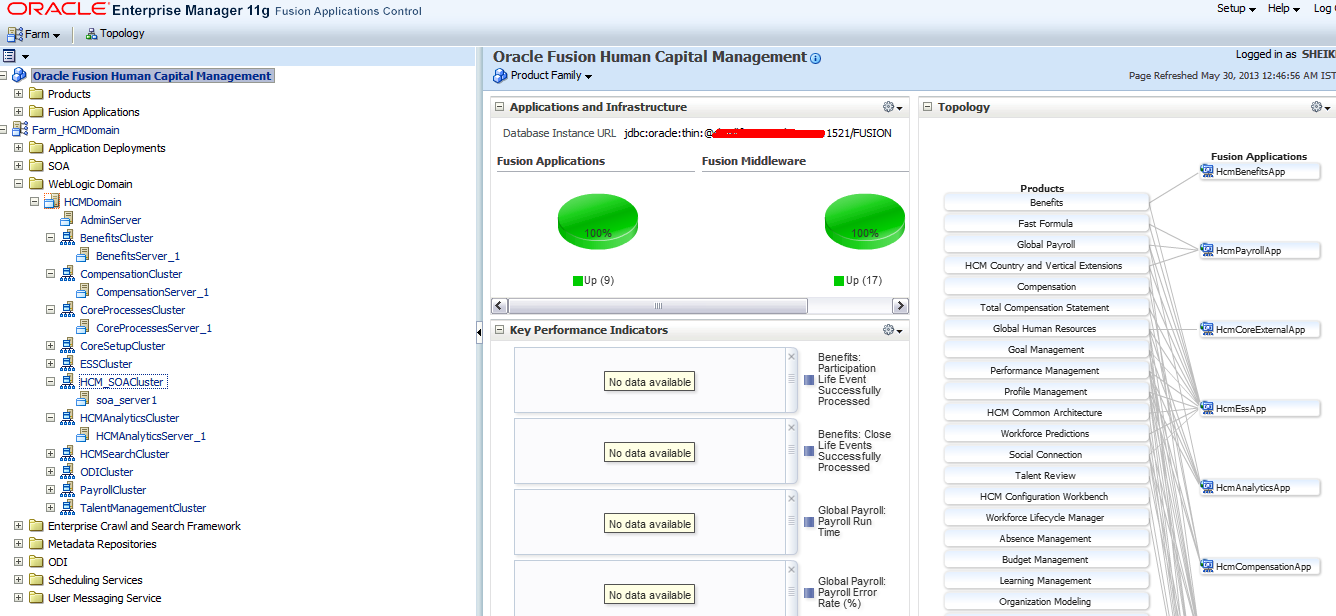
 As can be seen on the left hand side you will have Farm Components, in the middle you have Fusion Applications and Fusion Middleware component status and on the right you have Topology view.
 Farm Components and Weblogic Domains. As you can see there is one Admin Server and Multiple Clusters. Each Cluster is having Managed Servers. And one or many applications are deployed on these managed servers.
 Fusion Applications and Fusion Middleware Status
 HCM Domain Topology View
 This shows the list of ear files present under HCM Product Family. For example HcmBenifitsApp,