Showing posts with label Security. Show all posts

Wednesday, 10 July 2013

OTBI - Duty Roles Required for Subject Areas

In order to access data in OTBI you need to have access to the Subject area that OTBI is accessing. Oracle has documented the steps to get the Duty Roles assigned by default in the RPD for different subject areas under MOS document ID 1487201.1. In my previous post - How to Know On Premise RPD File Name and Location? - I have explained how to get the RPD file. Now if you open that in BI Administration Client Tool and then follow the steps mentioned in the MOS note, you will get the duty roles required for each of the Subject Areas in FSCM, CRM and HCM. Oracle has also uploaded output of the Permission Report from RPD file in that note. You can get the duty roles from there and log on to Oracle Entitlement Server/Authorization Policy Manager to get the details of the Application Roles, Role Hierarchy and Job Role Mapping.

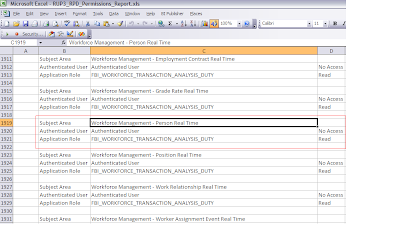
You can also get the sample file from here. Let's track the Application Role Mapping in APM. As you can see from the next picture that Authenticated user does not have any access on Workforce Management - Person Real Time subject area. To get the data from this subject area you need to have FBI_WORKFORCE_TRANSACTION_ANALYSIS_DUTY role.
If I log on to APM and search this duty role then I will get all the required details.
You can navigate to APM from Fusion through FSM task Manage Duties or Manage Role Templates.


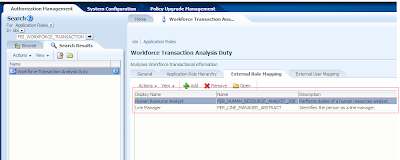
Once you have the duty role click on Open and the screen should look like the next picture


From here you can see what are all the other roles this duty role inherits permission from. You can also see which are the Job Roles it has been mapped to.

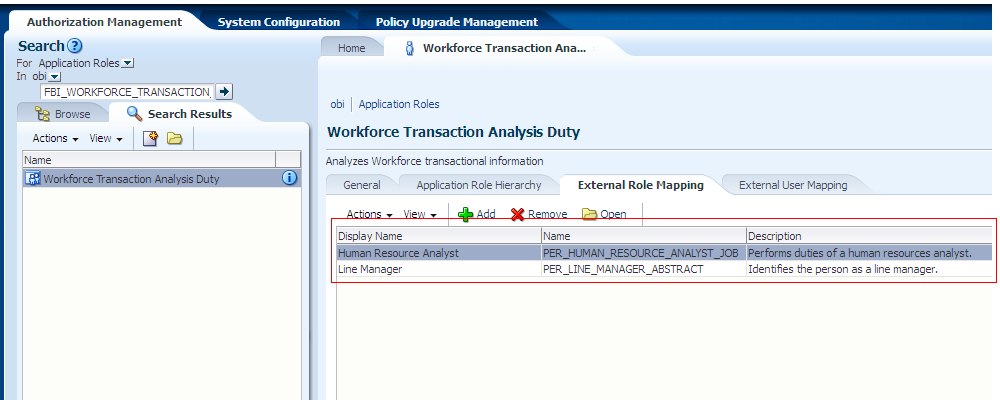


Role Hierarchy.


External Role mapping - As can bee seen that this duty role is mapped to Human Resource Analyst job role and Line Manager Abstract role. So if you have been provisioned with this role then you can access the data for this Subject area.


In my previous post I have also explained how to Assign BIAdministrator or BIAuthor to a user here.

So now you understand which Job role you need to be provisioned.

Cheers......................

Sunday, 9 June 2013

Fusion Apps Security Vs EBS Security Part I

There is a wonderful blog on Fusion Security by Jani Rautiainen. People who are from EBS background will be able to connect EBS security with FA security. Only thing they have to know which terminology maps to what.
If you are from EBS background you know that security is handled through Functions, Menus, Responsibilities, Users and Profile Values, Request Groups, Data Groups and in some cases (Purchasing, Shipping etc) the inbuilt logic.


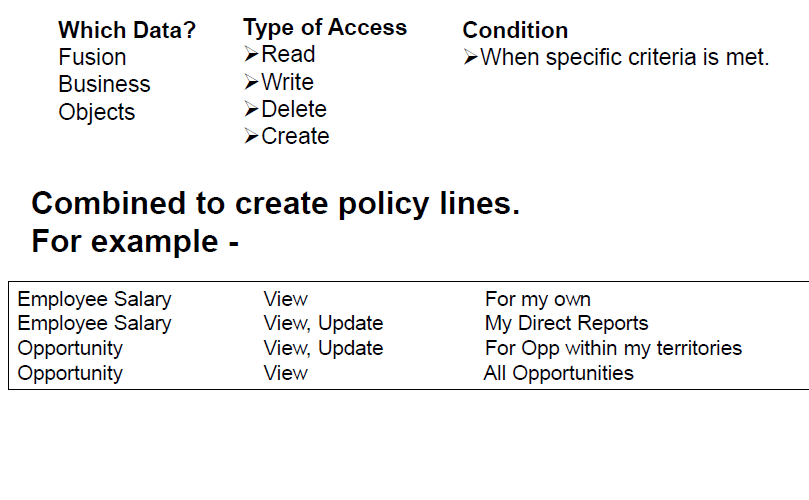
Where as in Fusion the access is fully controlled by RBAC (Role Based Access Control). The concept is very simple 'WHO can do WHAT on WHICH set of data'

Here WHO is user who has been assigned a set of roles, e.g. SHEIKHM is the user who has been assigned roles
You can log on to OIM with your user to access Oracle Identity Manager - Self Service Page. Click on My roles and you will see the list of roles assigned to you. If you have OIMADMIN privileges which is basically the IDM Administrators role, then you can add remove roles from users.

'WHAT' is Duties/Privileges under the Roles
What also determines what menu items will appear under Navigator and what Tasks the user will be able see from the Task Panes.


'WHICH' is basically Data Security and it determines what data you will see on the screen.

In EBS we setup users from System Administrator Responsibility - > Security - > Users
There we create user credentials and assign list of responsibilities. In Fusion this is done in OID and the same is managed through OIM (if customer has not used any other third party LDAP store for identity).
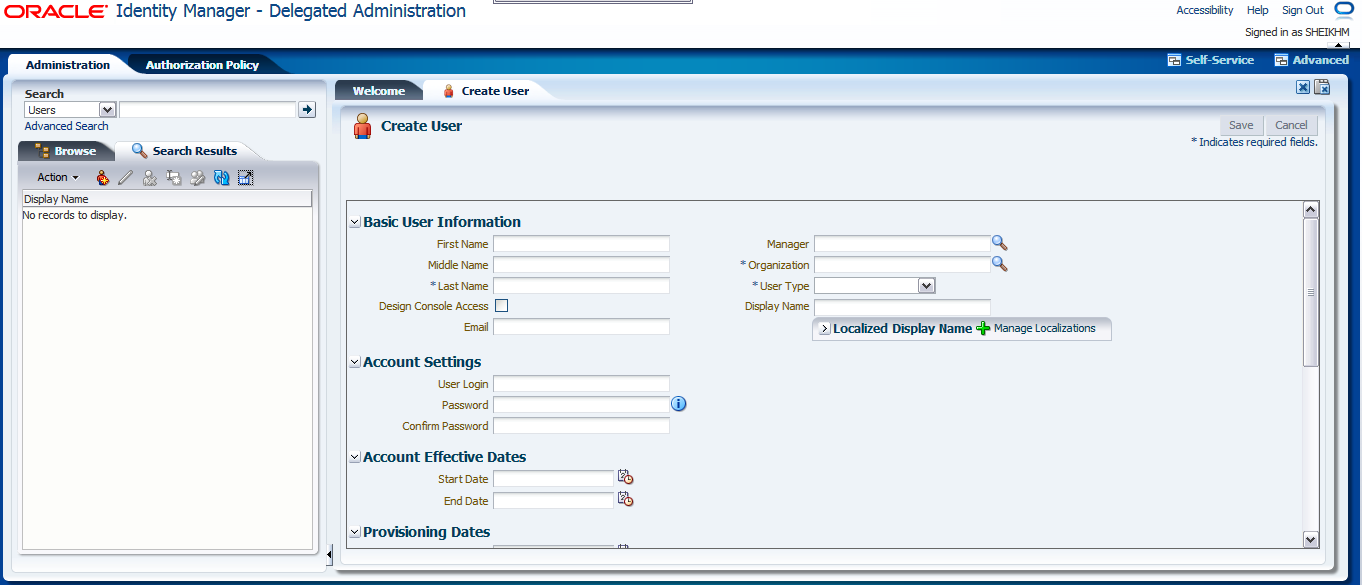
To do this navigate to Oracle Identity Manager - Delegated Administration and then click on Administration link placed at the top right hand side and  click on Create User

Once you have entered the user details and clicked Save, the Role Provisioning screen will appear where you will specify roles the user will be provided. In EBS we have Function or Menu exclusion provisions. But here in Fusion I believe we don't have that till now. Though it is not recommended to create Application Users from OIM except for initial implementation users, but still we need to know how these Middleware Components fit into overall architecture. Use HCM Role Mapping Rules to automatically assign roles when they are created through any interface like FBL or HR2HR.

In EBS the menu, the user will see is determined by Responsibility Definition. There we specify the menus and their sequences. The menus consist of Sub-menus or Functions. The function may call Oracle Form, SRS screen or OAF page. Where as in Fusion the Applications UI has been built using ADF and the security has been incorporated there itself. The pages, regions, Task Flows, menus, Dashboards etc are protected using Security Context. The Security Context  is provided by Oracle Platform Security Services(OPSS).
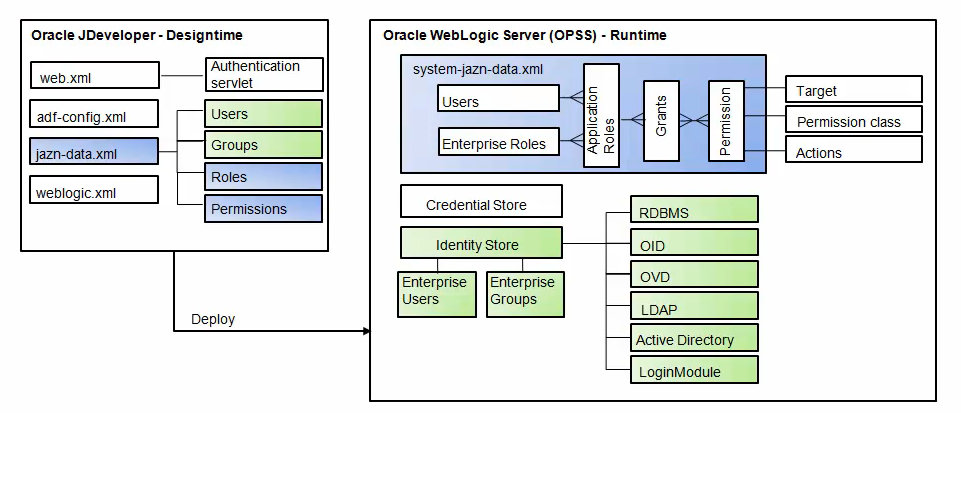
Oracle Fusion Applications designers leverage the Oracle Platform Security Services (OPSS) framework through Oracle JDeveloper security wizards.
As shown in Figure OPSS is the security foundation for Oracle Fusion Middleware: all Oracle Fusion Middleware components and Oracle Fusion Applications “consume” the OPSS framework’s services.

OPSS is a self-contained, portable environment that runs on an application server such as Oracle WebLogic Server. If you are familiar with ADF you know  that at development time, OPSS services are directly invoked from the development environment (Oracle JDeveloper) through wizards. When the application is deployed to the runtime environment, systems and security administrators can access OPSS services for configuration purposes through Oracle Enterprise Manager Fusion Middleware (FMW) Control, command line tools such as WebLogic Scripting Tool (WLST), and more specifically Oracle Authorization Policy Manager (APM).
This figure shows you design time OPSS and Run Time OPSS. Let me go to one step down to show you how security is configured in ADF


Some Application Roles are created in ADF because the framework Supports security for Resource Type as Task Flow, Pages, Regions, ADF Methods etc.  Some of them are incorporated in the logic itself. now the question is How will I know what are the roles that are shipped with the respective applications


Let's see them for HcmPayrollApp under HCM Product Family.
Log on to you HCM Domain Enterprise Manager Fusion Applications Control.

Expand Oracle Fusion Human Capital Management --> Fusion Applications --> HcmPayrollApp
Then select HcmPayrollApp


This is the screen which you will see after the selection. Now to see the Shipped Application Roles. To get that navigate to the pages as shown in the next picture


One you do that the next screen will show you all the application roles and their associated external role mapping


Once you do that you will see the location of the policy store provider and the list of application roles (These are basically duty roles).
If you select any of the roles and click on edit you will see the mapping with other Application or External Roles as shown in the next picture


Now if you log on to Oracle Authorization Policy Manager (APM) to see the list of entitlements and associated grants for the Roles you will have the clear understanding. APM is a graphical user-interface console for managing OPSS-based authorization policies. APM was specifically designed to support Oracle Fusion Applications’ security policies using a centrally managed approach. APM is designed for customers relying on Oracle Fusion Middleware products consuming OPSS services, such as Oracle Fusion Applications, or OPSS used by in-house custom applications.
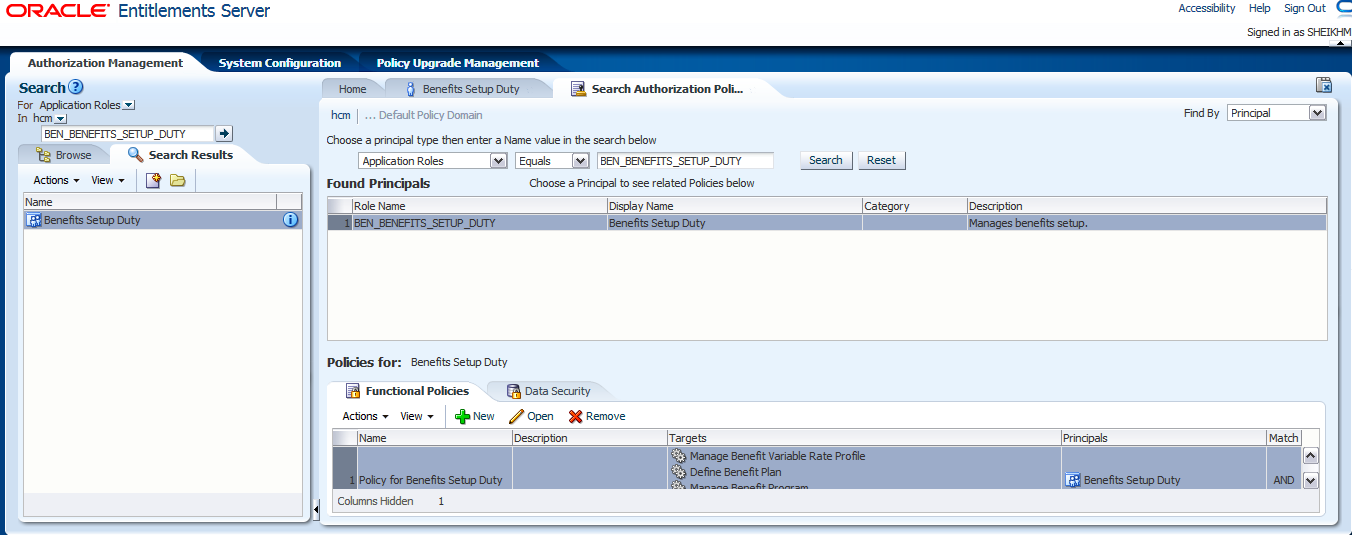
Here our aim will be to see how the ADF resources are secured and how to view this configuration. So let's take BEN_BENEFITS_SETUP_DUTY for this case study. In APM when you log on you will see the screen as below
At the Top Left you will see a section called Search. Select For Application Roles in hcm and search for BEN_BENEFITS_SETUP_DUTY
and click GO


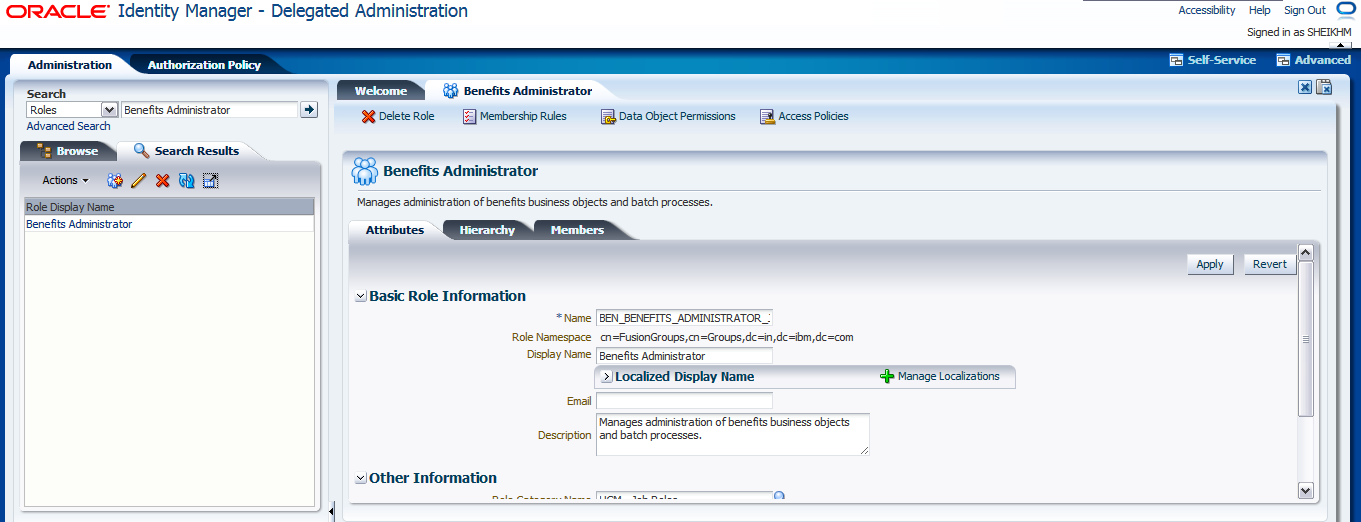
This is what you will see when you search. Click on Open. It you show the details of the Application Role - Application Role Hierarchy, External Role Mapping & External User Mapping. As you can see from the next screen that BEN_BENIFITS_SETUP_DUTY role has been mapped to Benefits Administrator and Benefits Manager Roles created in your LDAP Identity store. The next picture from OIM confirms that
I logged on to OIM and searched the Job Role which is nothing but External Role created in OID. Now let's go back to APM and try to see the Authorization Policies for our DUTY Role


So after opening the Application Role click on Find Policies at the top right hand side. This will show the Authorization Policy. Now as can be seen from the picture that there are two tabs Function Security and Data Security Policies.
Function Security decides the access to UI where as Data Security decides the data you will see on the screen. So let's see what the user assigned with this role (though Duty roles are not directly assigned to users but for the sake of understanding let's assume that this has been done).

By default Function Security Tab is automatically selected when you open Authorization Policy.
Here you see that there is one Function Security Policy has been specified and that is basically Entitlement Set. Now click on Open you will see list of Entitlements. Entitlements are nothing but group of Resources and corresponding Actions that can be performed on those. The following picture will show those.

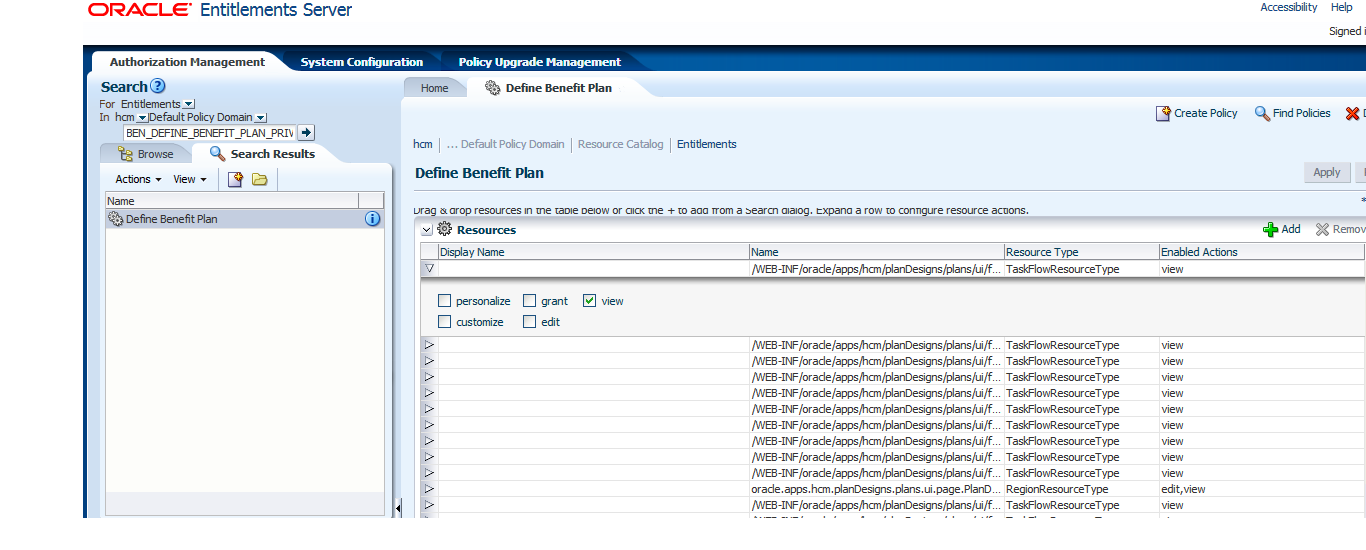
Click on the info button and you will see the Entitlement Name. Now to see what all the resources (UI, Task Flows)  that can be accessed through this role. Let's search this Entitlement.


This screen specifies that the user who has been assigned this role directly or indirectly will be able to access the Task Flows as mentioned, e.g - PlanEnrollmentFlow and Page e.g - PlanDIConfirmationPageDef


In OPSS, the pages are defined as resource and they are specified as shown in the picture.

So this explains the way the UIs are secured in Fusion Applications. I will show how Data Security Policies are specified in the following posts.


Summary

Fusion Applications has been developed using ADF where the security has been introduced decoratively using OPSS APIs which are then deployed in Weblogic Domains and is then configured there by Security Administrator using Graphical Tool APM. At run time ADF delegates authentication and authorization to OPSS which then uses OID or any LDAP Identity and Policy store to get the details of roles and privileges the user has and accordingly access is granted.

Cheers......................

Sunday, 26 May 2013

Reports and Analytics not Available under Navigator -> Tools

When I started using Fusion Apps as a beginner I was given a generic role which did not have all required menus to explore different areas like Reports and Analytics, Scheduled Processes etc. Our sysadmin also did not have idea about the roles required for these. After going through different documents and oracle notes I found that those menus appear only if you have Employee role assigned to your user ID in OIM.

 Log on to OIM as OIMADMIN and search your user id and then click on Role. Add the Employee Role and save.
Once the role is added log into FA Home page using your id, Reports and Analytics and Scheduled Process should appear under Navigator -> Tools as shown.

How To Assign BIAdministrator Role to a Fusion Applications User??

If you need BIAdministrator or BIAuthor in order to be able to access the Fusion Applications OBIEE Home "Administration" link and/or to create a data model, then this will help you to assign the required roles. At present BIAdministrator or BIAuthor role is not available in OIM. You have to add this through BI Domain enterprise manager.
Following are the details

  1. Log on to the BI Domain Enterprise Manager. If you do not have access to this then add the role to you id in OIM  e.g.       http://host:port:10201/em
  2. On the left panel, navigate to: Farm_BIDomain > WebLogicDomain > BIDomain. 
  3. Click on BIDomain.
  4. On the right panel, click on the BIDomain WebLogicDomain drop-down menu on the top left hand corner
  5. Navigate to Security > Application Roles
  6. On the Applications Role UI Search pane,
  7. Select the 'Select Application Stripe to Search' radio button. This will enable the text field for app-stripe.
  8. On the enabled drop-down field select the 'obi' value.
  9. On the Role Name field enter 'BIAdministrator'.
  10. Then select the 'Search Application Roles' go to button.
  11. On later versions of Enterprise Manager, the Role's Members are displayed in a list underneath the Role
  12. On the detail result section, select the BIAdministrator role name. This will open the Edit Application Role : BIAdministrator UI.
  13. In the Add User Dialog search for user log in string
  14. Once the user is displayed in the Available users pane, shuffle the user to the Selected Users pane. Then press OK to save the changes. On later versions of Enterpise Manager, search for the desired user log in string, then click "OK".
This will add the user to the BIAdministrator role. Server bounce is not required for changes to take effect.  Instead, this change requires that the ESS job named Retrieve Latest LDAP Changes (formerly SyncRolesJob) be run to synchronize the change from Enterprise Manager in to Fusion Applications.  Please run this job.

For Details with screenshot please check this note 
How To Assign BIAdministrator Role to a Fusion Applications User [ID 1395598.1]

Cheers

        Fusion Apps - How to navigate from FA to APM?

        Navigation: FSM(Navigator -> Setup & Maintainance) -> Manage Role Template


        Fusion Apps - How to map Roles, Duties and Privileges in Fusion Applications?

        The seeded Job Roles are created in OID, OIM and APM after completing all Post-install tasks and Common Implementation steps per "Getting Started with Oracle Fusion Applications: Common Implementation (Doc ID 1387777.1)"
        For more information on seeded roles, please review:

        Mapping Of Duty Roles To Top Level Menu Entries in Fusion Applications (Doc ID 1459828.1)
        Mapping Of Roles, Duties and Privileges in Fusion Applications (Doc ID 1460486.1)

        Fusion Apps - How to customize the Navigator Menu?

        You can Customize the menus which appear under navigator. This can be done using FSM(Navigator->Setup & Maintainace). The name of the task is Manage Menu Customizations.


        Fusion Apps - How to navigate from FA to OIM?

        OIM is generally deployed in a separate domain and could be accessed directly typing the URL provided during installation. Also it can be navigated from FA. The navigation for the same is


        Fusion Apps Role for access to Weblogic Admin Console, Fusion Middleware Control and FA

        I was trying  hard to understand the architecture of Fusion Apps Pillars. Every thing in Fusion Apps is controlled by RBAC. In Fusion Applications you have three different User Interfaces targeted for different group of people.
        These are

        1. FA UI where user will login and do his/her daily duties
        2. Fusion Middleware Control for maintaining and monitoring system health
        3. Weblogic Admin Console used to deploy services, adding, removing,starting and shutting down domains
        If someone wants to understand and have full idea of all these three areas then he needs to have a role assigned with his user id. Now the question is - Is there a single role that will give access to all of the above areas??
        The answer is yes. There is a role named Administrators. If that role is assigned in OIM to an user then he would be able to access all of the above.