Showing posts with label OTBI. Show all posts

Wednesday, 14 August 2013

Fusion Apps - Can we update User Name using FBL??

I was doing some analysis whether we can use User Name Expression parameter of Manage HCM Configuration for Coexistence to create or update the user name with which user can log on to Fusion applications.

I have created a document with step by step instructions I followed to try this. You can find the document here.

Please share your thoughts and feedback. Try from your end and let me know if that works for you.

Keep checking this blog.

Wednesday, 10 July 2013

OTBI - Duty Roles Required for Subject Areas

In order to access data in OTBI you need to have access to the Subject area that OTBI is accessing. Oracle has documented the steps to get the Duty Roles assigned by default in the RPD for different subject areas under MOS document ID 1487201.1. In my previous post - How to Know On Premise RPD File Name and Location? - I have explained how to get the RPD file. Now if you open that in BI Administration Client Tool and then follow the steps mentioned in the MOS note, you will get the duty roles required for each of the Subject Areas in FSCM, CRM and HCM. Oracle has also uploaded output of the Permission Report from RPD file in that note. You can get the duty roles from there and log on to Oracle Entitlement Server/Authorization Policy Manager to get the details of the Application Roles, Role Hierarchy and Job Role Mapping.

You can also get the sample file from here. Let's track the Application Role Mapping in APM. As you can see from the next picture that Authenticated user does not have any access on Workforce Management - Person Real Time subject area. To get the data from this subject area you need to have FBI_WORKFORCE_TRANSACTION_ANALYSIS_DUTY role.
If I log on to APM and search this duty role then I will get all the required details.
You can navigate to APM from Fusion through FSM task Manage Duties or Manage Role Templates.


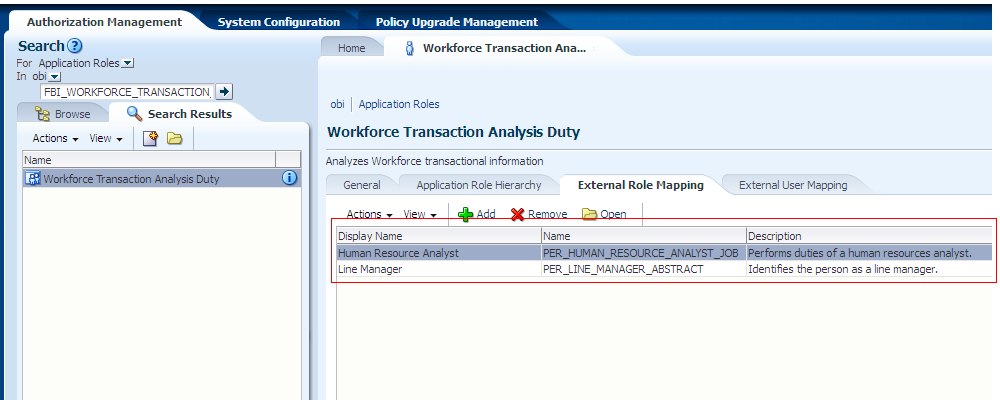
Once you have the duty role click on Open and the screen should look like the next picture


From here you can see what are all the other roles this duty role inherits permission from. You can also see which are the Job Roles it has been mapped to.


Role Hierarchy.


External Role mapping - As can bee seen that this duty role is mapped to Human Resource Analyst job role and Line Manager Abstract role. So if you have been provisioned with this role then you can access the data for this Subject area.


In my previous post I have also explained how to Assign BIAdministrator or BIAuthor to a user here.

So now you understand which Job role you need to be provisioned.

Cheers......................

Friday, 7 June 2013

Oracle Transactional Business Intelligence (OTBI) - Technology Overview Part II

In Oracle Transactional Business Intelligence (OTBI) - Technology Overview Part I I explained about OTBI architecture and it's OBIEE connections details. Many of you may be wondering how to get the the RPD file and  then open it in BI Administration Tool.

Here is the link where I have explained how to get the latest copy of the RPD file from server. This file is created during installation and is a huge in size. By default this has both OBIA and OTBI. Many customers might not be using all of the product families. Depending on the product family you can trim the RPD and keep only those which you are using or which you have installed. This makes it easy for maintenance. If you use default file then it takes too much time to download to local machine, open it and then upload it in offline mode. It also takes long time to open it on-line mode. Oracle has provided way to trim this file.Here is the link for trimming the RPD. In this example I have not used trimmed file. Use any FTP tool to copy the RPD file to your local m/c.

So now you have the file but you don't have the client tool to open it. You need to install the correct version of the tool to open it. The best way to do is to download it from OBIEE Home Page. Log on to the Oracle BIEE Home using the link http://yourcompany.com:10621/analytics/saw.dll?bieehome   and then click on Download BI Desktop Tools under Get Started 
Select the right installer depending on whether your OS is 32bit or 64bit.


Once you have installed the client tool, go to Program Files->Oracle Business Intelligence Enterprise Edition Plus Client Tools -> Administration. Copy your file in the folder e.g C:\Program Files\Oracle Business Intelligence Enterprise Edition Plus Client Tools\oraclebi\orainst\bifoundation\OracleBIServerComponent\coreapplication\repository  and then open it from BI Administration Tool. It will prompt for password to open it as the file is password protected. Ask your system administrator or DBA for the same. This is the password specified during installation.


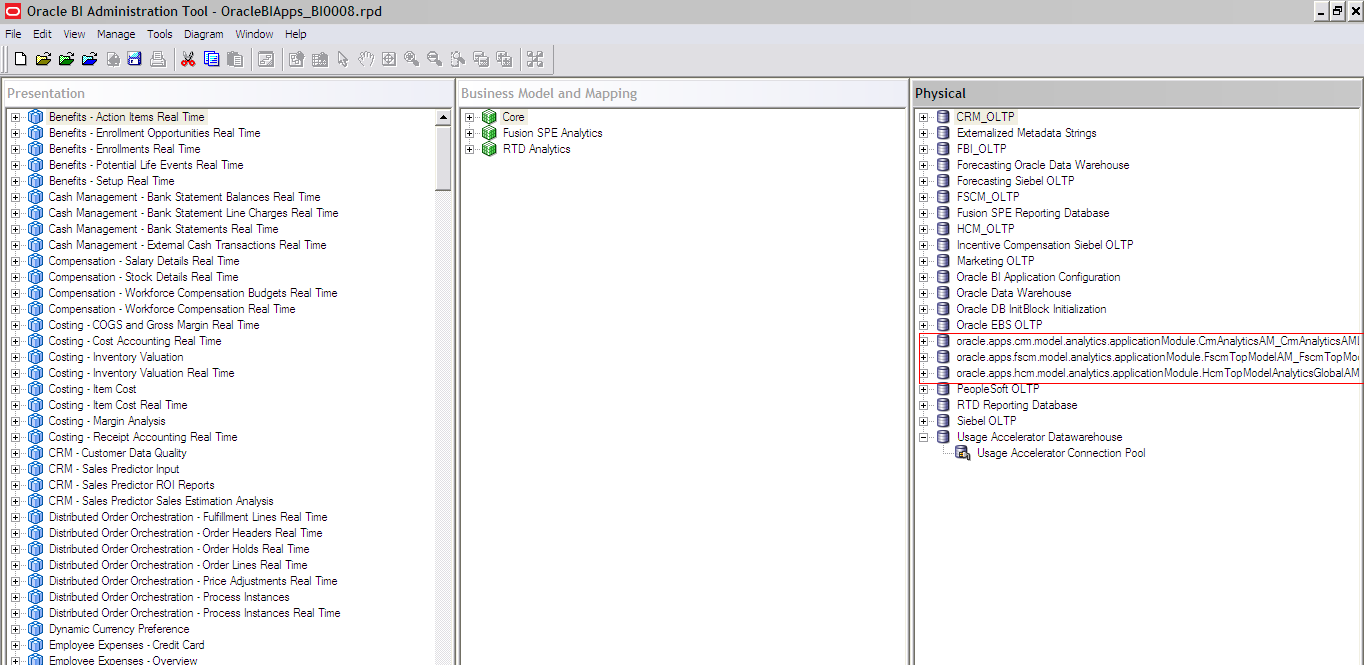
This is what you will see when you open the RPD file.


This covers Opening the RPD file from BI Administration Tool.

Cheers..................

Thursday, 6 June 2013

How to Know On Premise RPD File Name and Location?

If you want create new Subject Areas in OBIEE for use in OTBI/OBIA then you have to modify the metadata repository file. To do that you need to know the latest copy of the RPD file and the location of the same.

How to find the latest copy and location?

Log on to BIDomain EM. Here is the link to know the domain details. So if your BIDomain is deployed on http://yourcompany.com:xxxx then EM would be http://yourcompany.com:xxxx/em.

Enter your user id and Password


Once you log on this is you will see. If you don't see this click on Oracle logo.


Expand Business Intelligence Node and select coreapplication. Once you have done this the screen should look like this.


Then click on Deployment and Repository tab. Under BI Server Repository Section you will see Default RPD. In this case the RPD file name is OracleBIApps_BI0008. Note that this is a shared repository and shared path is /u01/app/oracle/fusion/instance/BIShared/OracleBIServerComponent/coreapplication_obis1/repository. If you log in to that path from UNIX box you may find that the RPD file names are not matching with default RPD file mentioned in EM. There is a MOS document OBIEE 11g: How is the Repository File Updated in a Clustered Environment and How To Identify the Latest Repository File in the Publishing Directory [ID 1484831.1]. This document explains why the file names under this folder are different.

So if the RPD file does not match with the file names under shared folder then how will someone get the exact file name?? There is also a MOS document How To View User Permissions in the RPD for Fusion Applications Business Intelligence [ID 1408832.1]. Under this document there is a section called Download the current copy of your RPD file.  There it has been specified the exact location of the rpd file as /APPLTOP/instance/BIInstance/bifoundation/OracleBIServerComponent/coreapplication_obis1/repository. But I could not find the path to be valid one. Generally APPL_TOP is set to /u01/app/oracle/fusion/fusionapps/applications. But inside APPL_TOP this path does not exist. I believe this path would BASEPATH/instance/BIInstance/bifoundation/OracleBIServerComponent/coreapplication_obis1/repository.  Where BASEPATH is the mount point of Fusion Apps.I don't know whether this is typo or our system environment is set like this. Anyway Oracle has to confirm this....
So if I go to the BASEPATH/instance/BIInstance/bifoundation/OracleBIServerComponent/coreapplication_obis1/repository  and do ls -ltr I could see this
Here I could see the OracleBIApps_BI0008.rpd file. Similarly you can follow this and get your latest copy of the RPD file and start modifying.


In the next series I will explain how to verify the connection and the database details to which OTBI report connects.

Keep reading................
Cheers


Monday, 3 June 2013

Oracle Transactional Business Intelligence (OTBI) - Technology Overview Part I

Oracle Transactional Business Intelligence(OTBI) is one of the reporting tools that Oracle gives access to it's customer for their reporting in SaaS model. Like me many of the people are coming from eBusiness Background. When they see SaaS access constraints they will wonder what this OTBI is.

OTBI is exclusively for Oracle Fusion Applications. It has been designed to meet real-time, ad-hoc, current state reporting and analysis of operational data. It combines Oracle ADF and OBIEE technologies. Below is the picture which tells everything about it.


OTBI Architecture

As can be seen from the picture that OBIEE uses ADF Model Layer View Objects for its meta data source. In ADF Model Layer Entity Objects(EOs) are created and VO objects are created from these EOs. These VOs represent the SQL query for the physical layer in OBIEE. These view objects simplify access to data and abstract the underlying data model and business logic complexities. By doing this oracle has made sure to keep only one source of truth. Changing business logic in one place makes it available in Fusion Applications as well as in OTBI.
Another fact is that OTBI and OBIA use the single logical definition of the object in the OBIEE Business Model and Mapping layer. This is a unifying factor that allows users to see the Oracle Fusion applications data from either a transactional or a historical perspective. Most of the common dimensions and a few facts in the Business Model and Mapping layer of Oracle BI repository are shared between Transactional Business Intelligence and BI Applications.

Once you open the RPD file in OBIEE Administration Client you will see that there are three connections of type OracleADF11g. Financials, Oracle Fusion Supply Chain Management Connection Pool, Projects, and Incentive Compensation use the FSCM connection; CRM and HCM use thier own connection Pools. So basically they are
  1. FSCM
  2. CRM
  3. HCM
Marked in RED are those three connections. If you double click any one of those connections you will see the something similar to the next screen.


This is what tells OBIEE to query ADF View Objcts in stead of tables. There is also a concept of SQL Bypass. This extracts the SQL query from the VOs and executes them in the database. In this process it reduces the burden of executing the VO objects.

Each of the three connection pools has one connection pool containing Oracle ADF server connection information, such as application server, application module name, and user information. Oracle BI Server uses this information in connecting to the data source.

Let's see how does SQL bypass works. Following is the picture from Oracle documentation which explains
You must set the SQL Bypass Database Option. To do that double click HCM(oracle.apps.hcm.model.analytics.applicationModule.HcmTopModelAnalyticsGlobalAM_HcmTopModelGlobalAMLocal)  in Physical layer; Click on Connection Pools Tab, select the Connection Pool and click on edit.
Once you click on edit button the next screen will pop up


Select the Miscellaneous tab.
Select Set.
Available database connections are displayed.
Select the database connection that is pointing to the Fusion Applications database, as shown in Figure, Connection Pool Miscellaneous Tab.
Select OK.


Now let's see how the View Objects are specified in the three connections - FSCM, HCM & CRM. The next screen will give a snapshot of some view objects in HCM connection


View objects are named using the following convention, which can help in tracking back to the corresponding module in Oracle Fusion applications:

Global Application Module Name. Sub-Application Module Name.view object-Name.For example:
HCMTopModelAnalyticsGlobalAM.AnalyticsServiceAM.CurrenciesPVO, where HCMTopModelAnalyticsGlobalAM is the application module name, AnalyticsServiceAM is the sub-application module name, and CurrenciesPVO is the view object name.Similarly, all the alias physical tables are named as <Dim/Fact>__VO-Name_Role.
The next screen shows this.


This is all about Physical Layer in RPD. The Business Model and Mapping layer is the one where business or logical model is written. It is also the layer where Mapping between Model and Physical layers schemas are specified. Business Models contain dimensions, facts (Logical Tables in OBIEE) and hierarchies (Logical Dimension in OBIEE).

All OTBI objects are part of Business Model Core, which is common model for both OTBI and OBIA.


Let's stop here today. At the end of this series I will show how to get RPD File and and open it OBIEE Client tool.

SO Till now you have got idea about the OTBI Architecture. In the next few post will cover Model Layer & presentation layer and will show on the fly how to create OTBI report from OBIEE.

Keep reading...


Cheers..............................